UNDER THE HOOD

SharedConX.Manager & SharedConX.Core

The configuration and automation engine behind SharedConX — one place to define how permissions behave, one service that keeps executing it, indefinitely, without anyone touching Exchange by hand.

Exchange On-PremisesHybridExchange OnlineEnterprise-scale licensing
Configuration

SharedConX.Manager

SharedConX.Manager is the admin console where every rule lives: which security-group naming pattern maps to which permission, how automapping behaves, what gets audited, and how the environment connects to Exchange. Nothing runs from here directly — Manager writes the configuration that SharedConX.Core then executes on schedule.

Regex-based group-to-permission matching
Full Access, Read, Send on Behalf & Send As, configured independently
Built-in license and environment detection (On-Prem / Hybrid / Online)
Exchange Online connection via certificate, secret, or access token
Configurable mailbox auditing (Admin / Delegate / Owner)
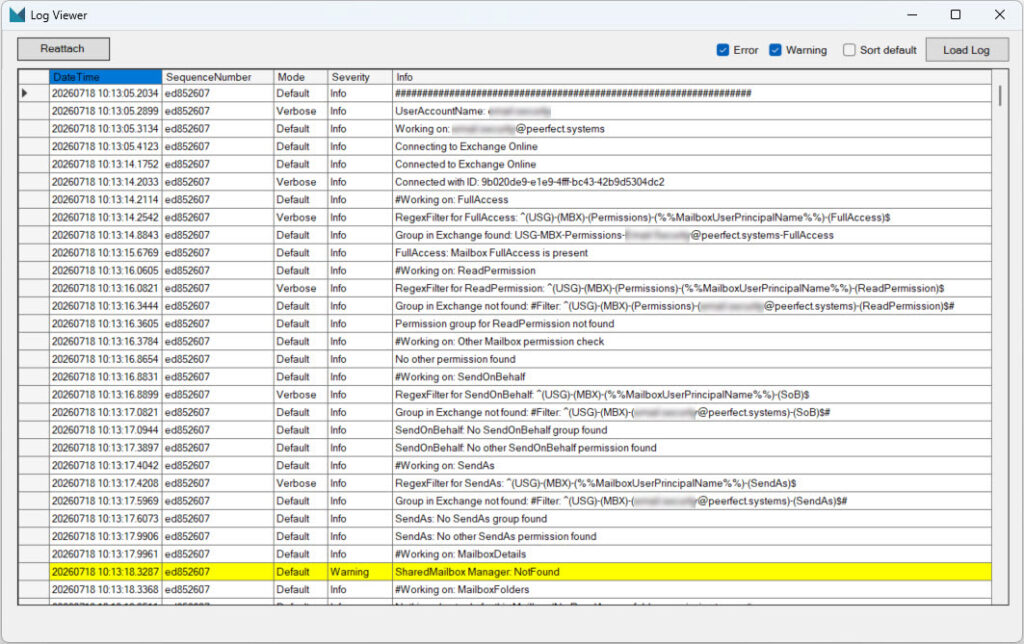
Built-in Log Viewer for troubleshooting without leaving the app

Execution

SharedConX.Core

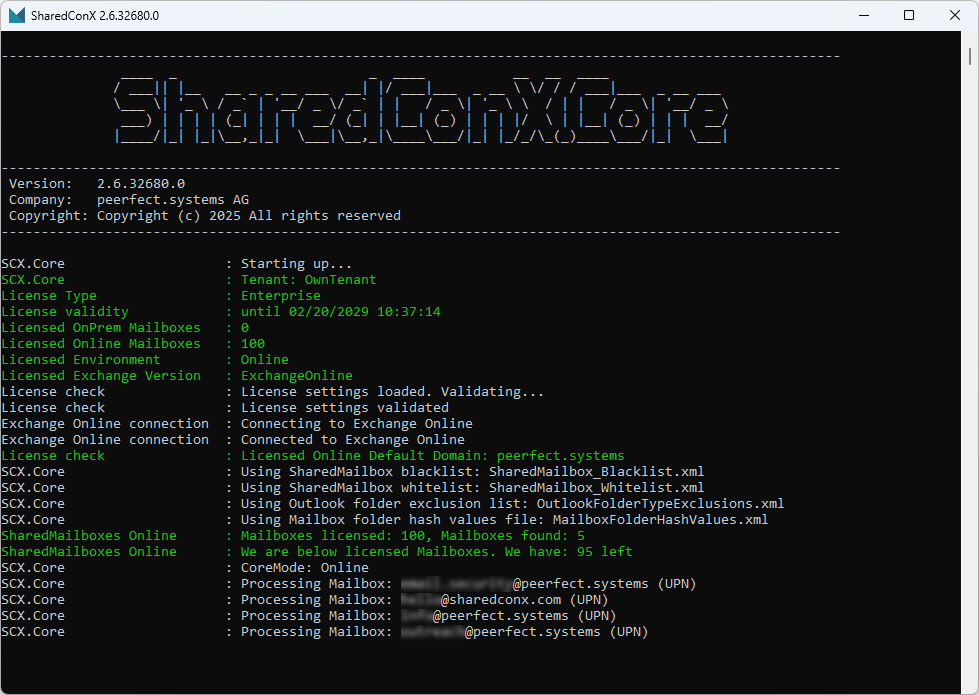
SharedConX.Core is the background service that reads the configuration from Manager and does the actual work: scanning mailboxes, matching security groups by regex, applying or removing permissions, and logging every step. It runs unattended on a schedule and reports its findings back through the Log Viewer.

Runs as a scheduled/unattended process, no manual triggering needed
Processes Full Access, Read Permission, Send on Behalf, Send As
Cleans up incorrect or orphaned group assignments automatically
License-aware: enforces the licensed mailbox count in real time
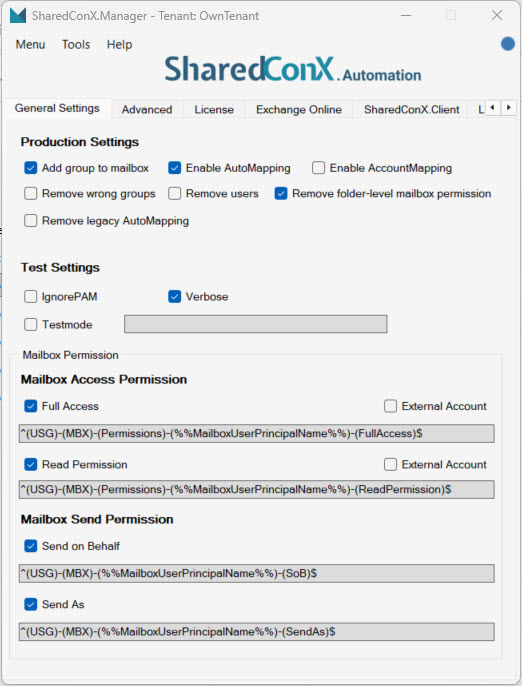
General Settings — production behavior, permission types, and their matching regex patterns.

SharedConX.Core console at startup — license validation, environment detection, and mailbox processing, all logged automatically.

Configuring permission rules

Permissions are matched to security groups by naming convention, using regular expressions defined once in Manager. Automapping and account mapping can be toggled independently, alongside test settings for safe rollout.

General Settings — production behavior, permission types, and their matching regex patterns.
Full AccessRequired for shared mailbox access. If no matching security group exists, the mailbox is skipped.
Read PermissionOptional, read-only access — same pattern structure, suffixed -(ReadPermission).
Send on BehalfGrants Send on Behalf rights. Suffixed -(SoB). Recommended in its own dedicated group.
Send AsGrants Send As rights. Suffixed -(SendAs). Takes precedence over Send on Behalf.
Add group to mailboxAutomatically adds matching security groups to the shared mailbox.
Remove wrong groups / usersCleans up groups or users not explicitly allowed by the configured patterns.
TestmodeFilter to a specific mailbox subset to validate configuration before full rollout.

Exchange Online connection & auditing

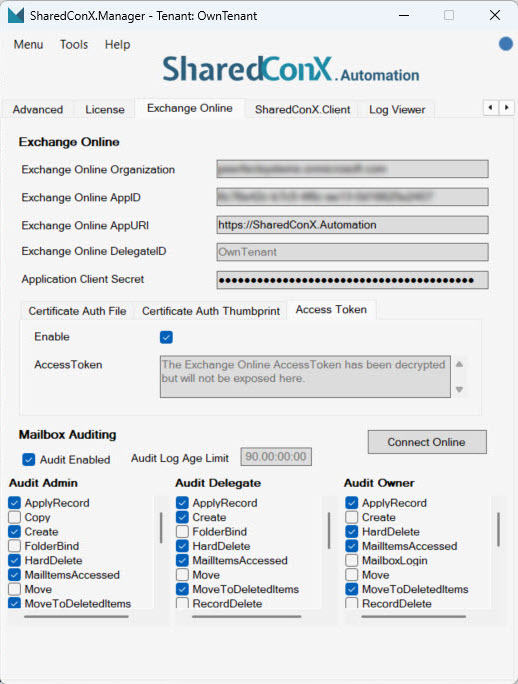
SharedConX.Manager connects to Exchange Online using a certificate, client secret, or access token — and configures mailbox auditing (Admin / Delegate / Owner actions) directly from the same tab.

Exchange Online tab — connection details and per-role audit configuration. Tenant-specific IDs redacted in the original screenshot — replace with your own if desired.

Licensing & environment detection

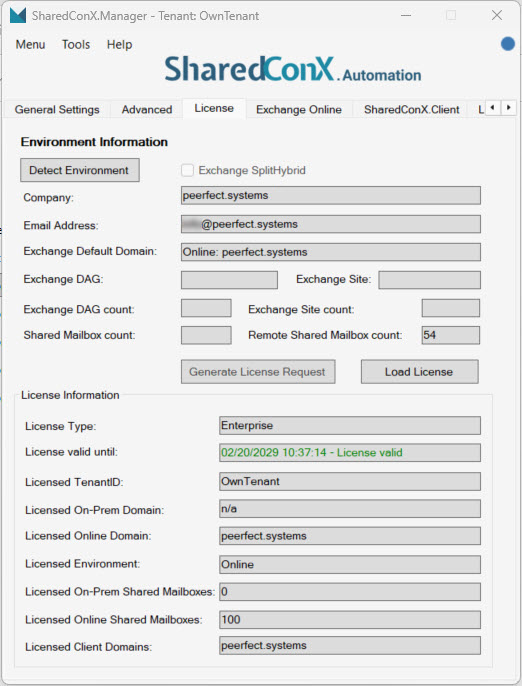
Manager can auto-detect your Exchange topology (On-Premises, Hybrid, or Online) and shows exactly how many shared mailboxes are licensed versus in use.

License tab — environment detection, license validity, and licensed vs. remote shared mailbox counts.

Built-in audit log

Every action SharedConX.Core takes — matched groups, applied permissions, skipped mailboxes, warnings — is written to a structured log, viewable directly inside Manager.

Log Viewer — filterable by Error/Warning, with full detail on every permission match and mailbox processed.

Advanced settings & SharedConX.Client integration

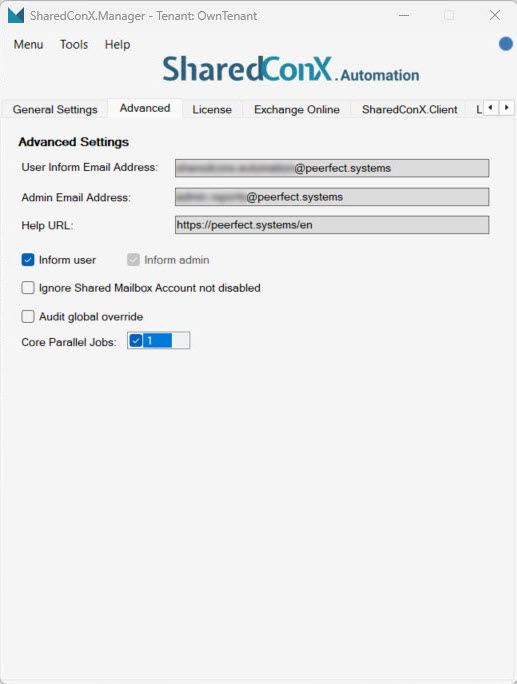
Advanced — admin notification address, help URL, and audit override behavior.
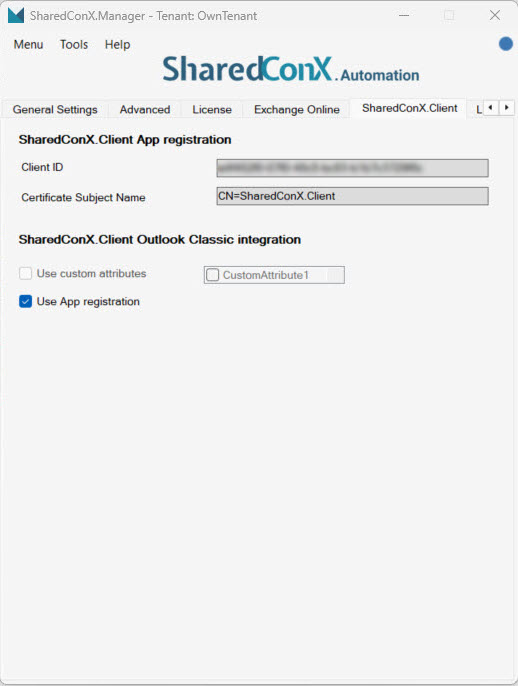
SharedConX.Client tab — links the Client app registration. Client ID redacted in the original screenshot.

Setup at a glance

A condensed version of the full Admin Guide. Every step below has a matching detailed walkthrough available on request.

1
Install PowerShell prerequisites
Microsoft.Graph.Applications, Microsoft.Graph.Authentication, Microsoft.Graph.Mail, Microsoft.Graph.Users (v2.35.1), ExchangeOnlineManagement (v3.9.2), and RSAT-AD-PowerShell for on-prem environments.
2
Register the SharedConX.Automation app in Microsoft Entra
Single-tenant app registration, with a redirect URI for native/desktop clients.
3
Grant API permissions
Microsoft Graph: Mail.ReadWrite, User.Read.All (Application). Office 365 Exchange Online: Exchange.ManageAsApp (Application), Exchange.Manage (Delegated). Admin consent required.
4
Add a certificate or client secret
Certificate-based auth is recommended for production; a self-signed certificate can be generated via PowerShell and uploaded directly to the app registration.
5
Assign the Exchange Administrator role
A Service Principal is created for the app and assigned the Exchange Administrator role so SharedConX.Core can manage mailbox permissions.
6
Connect Manager to Exchange Online and load your license
Enter the Organization, AppID, AppURI and chosen authentication method, then run Detect Environment and load your SharedConX license.

See it running in your environment

A no-obligation initial consultation shows exactly how Manager and Core would be configured for your Exchange setup.